

The Small Business Guide to Ditching the Spreadsheet: 5 Steps to Organized Customer Data
You’re probably juggling a few versions of “the” spreadsheet, a pile of email threads, and notes in someone’s notebook. Leads slip. Reminders get missed. And if the one person who “knows the file” is out sick, follow-ups stall altogether. This guide shows a simple, low-risk path to move from messy sheets to an organized, shared system—without the cost or complexity you fear.
Step 1: Map what you have (and what really matters)
- Find your data sources: spreadsheets, email exports, form fills, notebooks.
- Decide must-have fields:
Company, Contact Name, Email, Phone, Owner, Source, Deal/Opportunity, Stage, Value, Last Activity, Next Step/Date, Consent. - Standardize labels: one naming convention for stages, sources, statuses.
- Assign ownership: one “data owner” maintains structure & naming.
Step 2: Clean and standardize before you import
- Merge and dedupe into one master list.
- Fix format: phone numbers, split names, normalize stages.
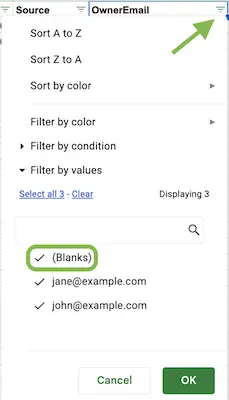
- Sanity check: fill blanks in critical fields.
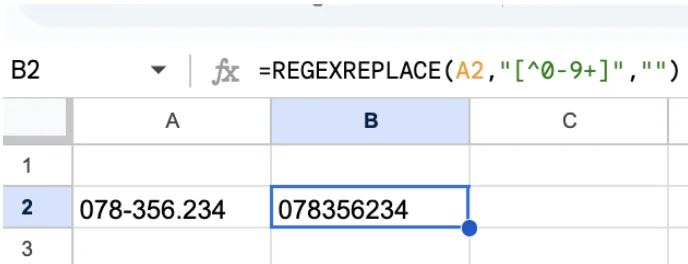
Standardize phone numbers
=REGEXREPLACE(A2,"[^0-9+]","")
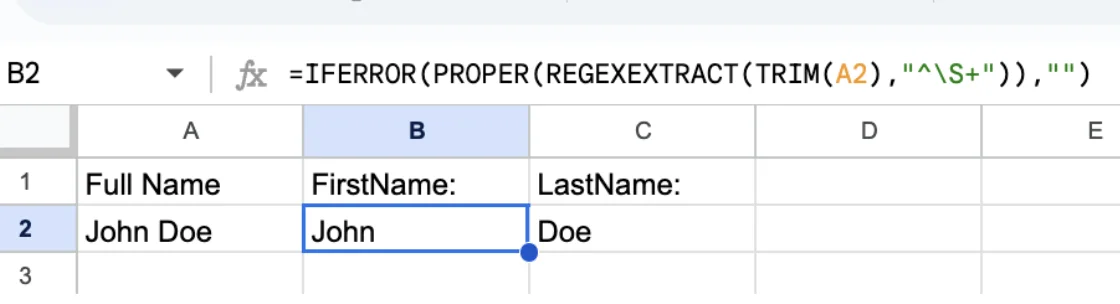
Split names
FirstName:
=IFERROR(PROPER(REGEXEXTRACT(TRIM(A2),"^\S+")),")
LastName:
=IFERROR(PROPER(REGEXEXTRACT(TRIM(A2),"\S+$")),")
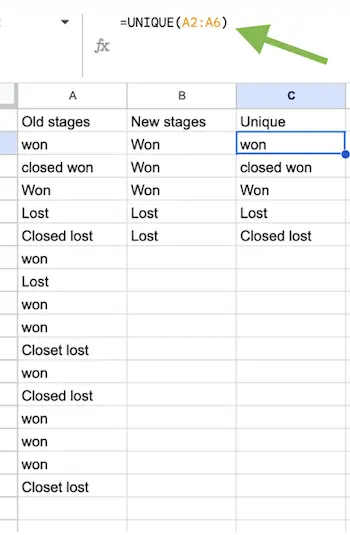
Normalize stages
=SWITCH(LOWER(TRIM(A6)),
"new","New lead",
"qualified","Qualified",
"qual","Qualified",
"proposal","Proposal",
"prop","Proposal",
"won","Won",
"closed won","Won",
"lost","Lost",
"closed lost","Lost"
)
Sanity check data
Step 3: Choose a simple CRM that fits today (and can grow tomorrow)
- CSV import for quick setup.
- Customizable pipeline/tasks.
- One dashboard for everything.
- GDPR‑ready and more secure.
Myths you might believe
- “We’re too small for a CRM.” — small teams benefit the most.
- “CRMs are too complex.” — modern ones are light & affordable.
Practical pick: Start with a simple plan covering contacts, deals, tasks, and reporting. Add automation later.
Step 4: Import and structure for follow-through
- Set up 4–6 clear pipeline stages.
- Import cleaned data, assign owners.
- Create working views: Overdue, New leads, Closing soon.
- Use web forms to capture incoming leads.
- Every deal has owner + next step task.
Step 5: Make it stick with a light weekly rhythm
Daily
- Work tasks, log notes, set next steps (15m).
Weekly
- Team review: move deals, dedupe, reassign (30‑45m).
Monthly
- Review reports, tweak stages, fix consistency (30m).
Two-hour quick-start checklist
- 20 min: Clean spreadsheet.
- 15 min: Define stages/fields.
- 20 min: Import contacts & deals.
- 15 min: Create three core views.
- 20 min: Add/test a lead form.
- 30 min: Quick team walkthrough.
How this fixes spreadsheet pain
- Single source of truth.
- Predictable follow‑ups.
- Shared visibility pipeline.
- Scales without complexity.
Next step: Move from spreadsheet to MiniCRM in 60 minutes
- Create MiniCRM account & export CSV.
- Import contacts/deals with owners.
- Customize stages & fields.
- Add a Web Form.
- Create weekly filters (Open Deals, Overdue Tasks).
- Send your first email inside MiniCRM.
- Enable invoicing to convert fast.
- Add consent field for GDPR.
Why move now
- Stop firefighting → consistent follow‑up.
- Start small, grow into automation.
Start with MiniCRM Go to leave spreadsheets behind. Then expand into Go Big (automation, extensions, invoicing) so your system scales smoothly.